Does WordPress really deserve the hate?
If you spend any time on X or Facebook groups about web dev, you’ve definitely seen the take that “WordPress is awful.” Developers and content managers complain about it, and people who were forced to maintain old WordPress projects often say it was pure pain.
Maybe even you, dear reader, don't have a good opinion of this CMS. But is WordPress really the problem? Where does all this hate come from, and is it actually justified?
What is WordPress?
In short: WordPress is the most popular CMS (content management system) in the world. Released in 2003, it currently powers about 40% of all websites on the web. Its success is due to several factors, primarily its free, open-source nature, with a large community that has actively participated in its development.
The power of WordPress is a very low entry level. Launching a website based on WordPress doesn't require any special technical skills, and many hosting providers offer a dedicated WP installer, which simply requires entering a few pieces of information and thats all - you have a working website.
You can add your own content, start a blog, choose from a wide range of free and paid themes that will change the default appearance of your website, and use a multitude of free and paid plugins that can transform your website into a full-fledged online store, reservation system, or even a mini social networking site in just a few clicks.
All of this can be done without writing a line of code, and if you do need to write something, the amount of information online about creating custom solutions in WordPress is one of the largest resources for this technology - which means that all LLMs can also perfectly vibe-code for WordPress.
Sounds good, so why the hate?
Indeed, what was the driving force behind WordPress's growing popularity has also become its biggest drawback. Its popularity, combined with its openness and low entry barrier, has led to the development of extensions and themes, which often act as overlays on WordPress, with questionable code quality that translates into poor performance, and this is a simple way to a poor user experience - for both those managing the site and end users.
If you have ever used WordPress and you saw something like this after your first logging into the dashboard, then you know what I mean.
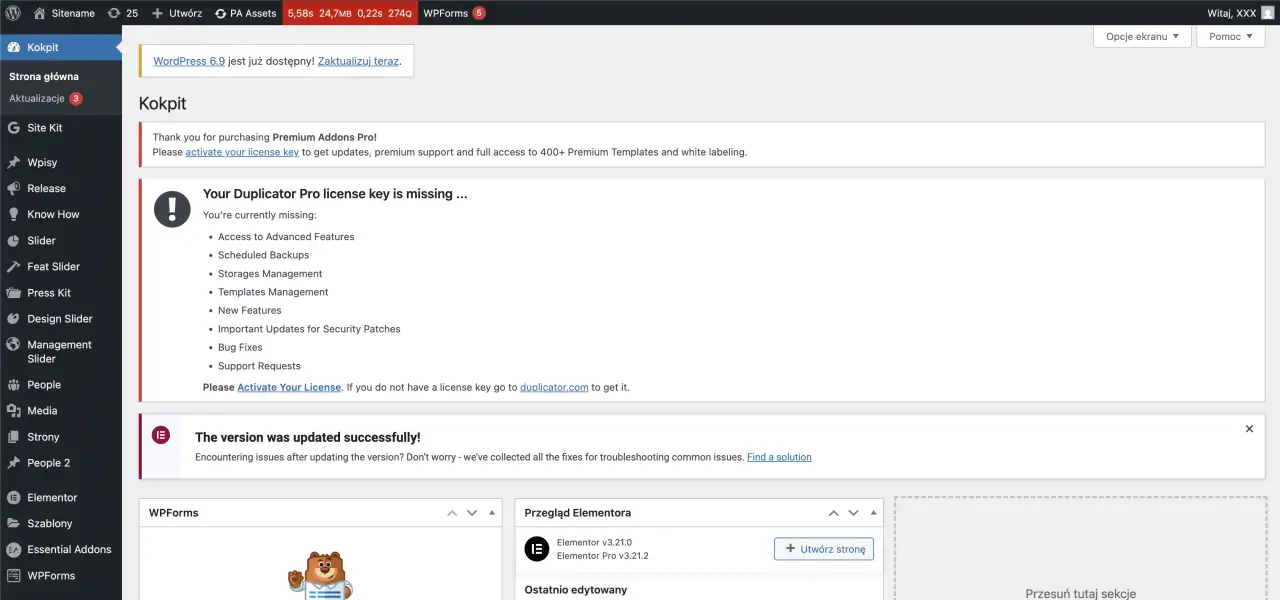
Dozens of plugins, most of them not updated, including some visual editor. Powered by theme that has hundreds of settings that allow you to do everything and nothing that works correctly at once. Unfortunately, these things are very common in the WordPress world and you are much more likely to come across a WordPress website that is made using this approach than one that is worth praising.
Lot of agencies calling themselves WordPress experts, freelancers, and self-proclaimed WordPress gurus create websites exactly like this: install a pre-made theme with visual composer, add a plugin for every functionality, and "run away," leaving the client with a monster that looks ok at first glance, but when the client wants to change something themselves or starts testing the site's performance, it turns out to be a chore.
This leads the client to believe that WordPress is crap because editing is difficult, the site is slow, something isn't working, or the dashboard isn't clear. Some of these clients will go to their dev friends and ask them to fix something - the dev will see the code, the dashboard, and it's easy to assume it's crap. A self-perpetuating machine of failure.
Don't hate the game, hate the player.
So, is WordPress the problem? No, and certainly not in the area where it garners the most hate. The WordPress authors don't recommend building websites based on questionable themes or plugins, let alone using visual editors that disable its biggest feature in recent years: the Gutenberg editor.
WordPress is therefore being criticized for the attitudes of those who use it, and unfortunately, they often take money from unsuspecting customers. It's a bit like blaming the manufacturer of a car model for skidding while driving on bald 20-year-old tires in winter. It's a bit like blaming the creator of a frying pan for making our breakfast taste bad and giving us a stomach ache, and not only can't make it, but also for buying stale ingredients.
WordPress isn't sexy in the dev community, when devs hear something is being developed in WP, they automatically throw it in the trash. In this time React, Next.js & Tailwind are all the rage, but does that mean everything made in this stack is of good quality, while WP isn't? Is the frequent criticism of spaghetti code in WordPress because WordPress forces it? Of course not, and just as we shouldn't blame WordPress for this, we probably won't blame React for the fact that so many poorly written applications have been created based on it in the world of vibe-coding. Poor use of technology is a developer problem, not a technology problem. A good approach and clean code will always hold water, regardless of the stack used.
WordPress can certainly be criticized for certain things, for example, it's not very well-written under the hood, it has its flaws, for example, due to backward compatibility, so that an update doesn't blow older plugins and themes out of existence, but the general hate is not really due to this reason at all, but only due to its misuse.
Another criticism of WordPress' creators is their lack of a clear, developer-friendly narrative, emphasizing the importance of best practices, and clearly defining preferred standards and how WordPress can be implemented effectively. Unfortunately, at many WordCamps and WordUps, you see plugins or approaches being pushed that damage WordPress's reputation internationally. But business is business, and someone has to sponsor it since the project itself is open source.
Don't get me wrong, I understand the reasons for some of the issues, and I understand that the WordPress developer handbook is being developed and growing. However, as a regular attendee of national WordCamps, WordUPs, and the global WordCamp, I felt a bit lacking in "advertising" a pure, developer-centric approach to WordPress. In my opinion, there was far too little of it compared to lectures promoting specific plugins or less-than-professional development approaches.
WordPress is just a tool, so how do you use it well?
WordPress give us enormous flexibility in choosing a solution. We can follow the classic CMS approach and use a great starter that utilizes modern solutions to create a theme. I personally highly recommend the Sage Starter Theme from Roots Team and the Vilare Starter Theme from my friend and WordPress mentor, Przemysław Hernik. Both of these themes utilize a modern approach, making development enjoyable, object-oriented, and emphasizing reusability and component-based approach.
Want to build a front-end using React, Vue, or Astro? No problem, we can use WordPress as a headless CMS and use the WordPress REST API to build a front-end in the technology that suits us best.
What about adding content? WordPress has been developing its Gutenberg editor for several years, which allows for pleasant, intuitive content creation based on reusable blocks. Creating any overlay that blocks this functionality is, in my opinion, a huge mistake. We already have access to numerous blocks that allow us to easily create, for example, a blog post, and through our own theme or plugin, we can expand our website with the necessary blocks, in line with the client's requirements and design.
We can take a native approach, creating custom blocks based on React, or in a way I prefer - ACF + Gutenberg, which combines customization with optimal development time. By using the native editor and combining it with organized CPTs, we can create an easy-to-manage website, even if it contains multiple content types and languages. And the ease of editing content in WordPress is crucial, in my opinion, because what's the point of basing a website on a CMS if editing content will be problematic or even impossible for the client to do on their own? In such a case, we could just as easily give them static HTML, it might even be easier for them to edit the content.
So, how we can put this into practice?
You probably remember the screenshot from the dashboard area posted above. I'd like you to compare it with what you'll see in the video below. This is an example of the edit experience on the WordPress website built by me.
Below you can also find a code example of one of block created for theme used on this website. I'ts a block controller and block template files, I think it looks much better than what you usually see in a WordPress theme.
With the right approach, we can create a super-optimized, visually stunning, and fluid WordPress-based website or store with a maximum of a few plugins. For non-e-commerce sites, two or three plugins are often sufficient (ACF + something for SEO, and forms if necessary, Contact Form 7). Managing such a site is enjoyable and intuitive - those familiar with the WordPress ecosystem have no problem with it, while those unfamiliar and non-technical users can easily edit it after a short tutorial.
Does this mean that WordPress is the perfect solution?
TL:DR - Of course not. WordPress has its flaws, like any technology, and every CMS has its strengths and weaknesses (like the mentioned legacy code of its core). However, a well-implemented WordPress can be ideal for many simple and complex websites, including eCommerce.
Thanks to the basic implemented functionalities (such as user management, Custom Post Types), WordPress is perfect for fast MVPs, where with a good developer approach, we can create relatively fast functionality, with a well-organized code base for future development, or future migration to a modern JS framework, where we will transform WordPress into a Headless CMS.
We should never cling to the idea of always using WordPress or always not using it. The choice of a specific solution should never be dictated by us preferences, it should be tailored to the client's business and technical needs. And a client's business need is never a poorly performing website based on 20 plugins and a visual editor that slows down editing and page performance. Similarly, a client's business need might not include WordPress at all due to technological limitations, for example.
WordPress has become infamous precisely because it was often chosen for the wrong tasks, and above all, in the wrong way. But in my opinion, the vast majority of the hate it receives should be directed solely at the people responsible, not at the CMS itself.
Interested in build something great together? Please contact me – I'd love to hear about your needs.